Overview of the Friends and Family dashboard section
Updated: 11/30/2023
Article #: 29
The Friends and Family section is where you can see who is participating and in what role.
From here:
- Authors can be added by the Purchaser or an Editor
- Readers can be added by the Purchaser, an Editor, or an Authors
- Guests can be added by the Purchaser or an Editor
- Editors can be added by the Purchaser.
To invite a new user, simply click the add person icon.
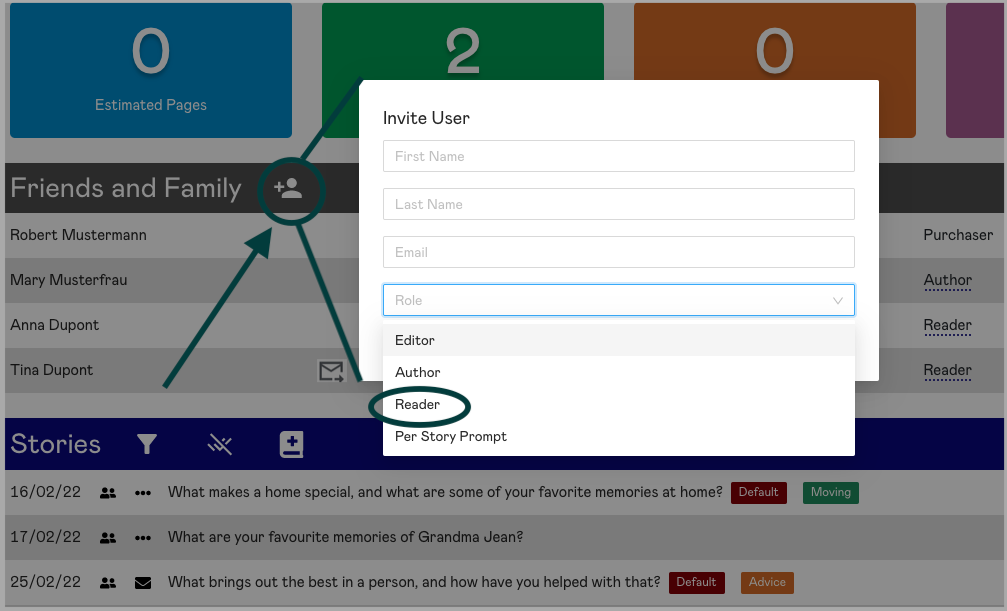
Add the person's name, email, and their role and click Send Invite. This person then receives an email notifying them they have been invited to participate.
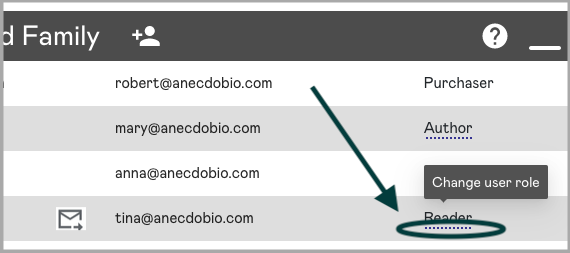
Additionally, Purchasers and Editors can also change someone's role. This is done by clicking on the role for that person and changing it in the pop-up that appears.

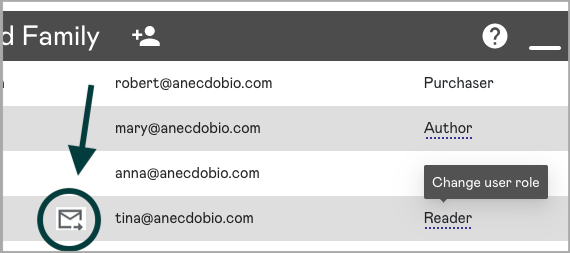
Should you wish to resend the invite email because the invited user has not yet responded, you can do so by clicking the mail icon next to their email address.

|
Rate this Topic:
|
|||
|
