(For an overview of all the various roles, click here.)
A Reader is someone who can read an Author's submitted story. Quite often the community built by participating in Anecdobio is its own reward. Readers love receiving notifications in their inbox of new stories that an Author has written!
Adding a Reader is easy. Purchasers, Editors, and Authors can choose to add Readers.
If it's desired that someone be able to read all the stories an Author submits, then the easiest way is to add a new user as a Reader from the Friends and Family section. This way they will receive an email notifying them of each new story any Author for that book submits. This is great, for example, for children when a parent is writing a book. All stories will be of interest to those children.
Here is how to add a Reader for an entire book:
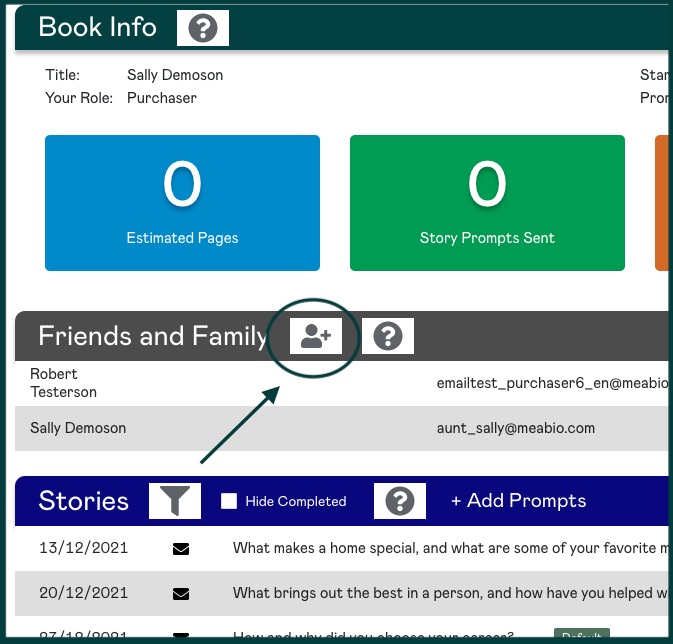
Click on the Add a New User icon; then enter the person's name and email and select Reader from the dropdown menu
On the other hand, if only one or a handful of questions would be of interest to someone, then you can just make that person a Reader for particular stories. In this case, add the person with the role of Guest. Then you can just select for which stories that person should be a Reader. This is great, for example, when an old school friend might only be interested in a stories like, "What was grade school like for your?" or "Who were your best friends growing up?" and not the rest of the book.
Please note, only the Purchaser or an Editor can add someone with the role of Guest. To do so, just select Guest as opposed to "Reader" from the Invite User role drop-down list.
|
Rate this Topic:
|
|||
|
